A Loose Cable That Broke Physics
In 2006, a team of physicists began building the OPERA experiment — a 730-kilometer underground tunnel from CERN in Switzerland to Gran Sasso in Italy, designed to measure the speed of neutrinos. Five years of construction. Roughly 100 million euros. The most rigorous experimental physics on the planet.
In September 2011, the results came back. Neutrinos were traveling faster than the speed of light. The team had just broken the laws of physics.
Except they hadn’t. After months of rechecking the math, the sensors, and the calibration, they found the root cause: a single fiber-optic cable that wasn’t fully plugged in. A loose connector had introduced a 73-nanosecond timing error — enough to make neutrinos appear superluminal.
Most of us aren’t building 730-kilometer tunnels. But we deal with “loose cables” every day when measuring software performance. A benchmark that shows a 5% speedup might be measuring thermal throttling, CPU frequency scaling, or a noisy neighbor on a shared cloud instance. The signal is real, but so is the noise — and telling them apart requires discipline.

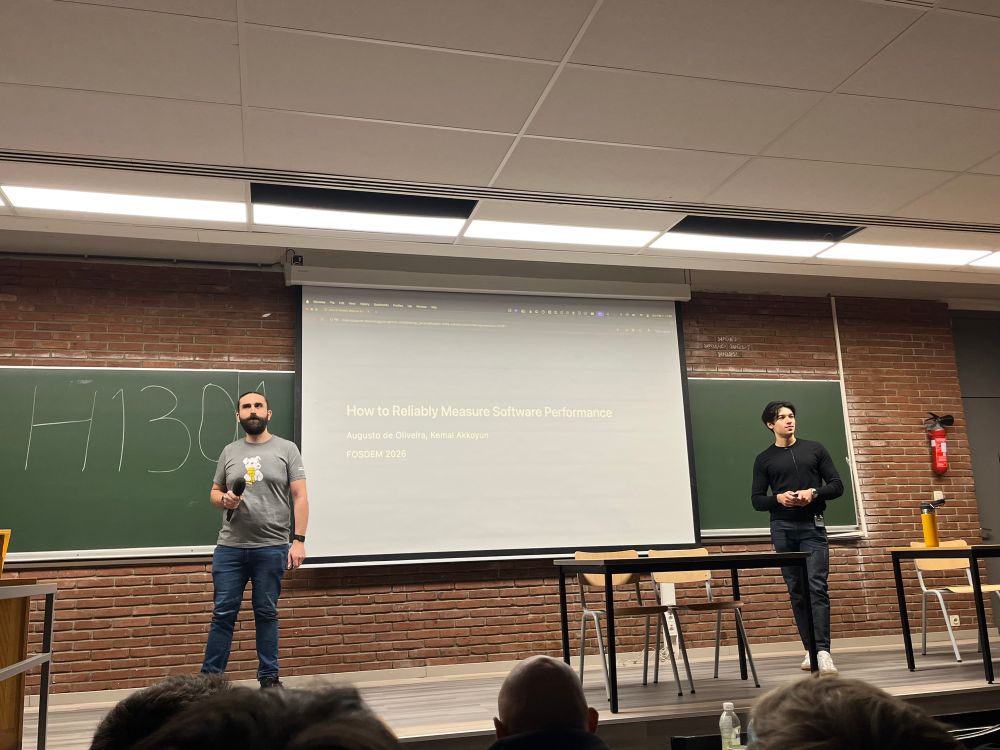
This post expands on the talk Augusto de Oliveira and I gave at the FOSDEM 2026 Software Performance Devroom. The slides and experiments are all open source.
Why Benchmarking Is Hard
Measuring software performance is a specialized version of a more general problem: finding a signal in a world full of noise.
Modern systems have layers of non-determinism that conspire against repeatable measurements. The CPU dynamically adjusts its clock frequency based on load and temperature. The OS scheduler moves threads between cores. Caches warm and cool. Background processes steal cycles. VMs share physical resources with other tenants. Memory layout changes between runs due to address space layout randomization (ASLR).
Any one of these factors can shift your numbers by a few percent. Stack them up, and a benchmark that reports a 5% improvement might just be measuring random variation. You run it again and the improvement vanishes — or reverses.
The gap between “I ran a quick benchmark on my laptop” and “this measurement is reliable enough to make decisions on” is enormous. Closing that gap requires controlling the environment, designing the benchmark properly, interpreting results with statistical rigor, and integrating the whole process into your development workflow.
Environment Control
This is the foundation. No amount of statistical sophistication will compensate for a noisy measurement environment. The sources of noise come from every layer of the stack:
| Layer | Sources of Noise | Mitigations |
|---|---|---|
| External | Network, temperature, vibration, virtualization | Bare metal instances, dedicated hardware |
| Application | Memory layout, compilation/linking | Fixed builds, disable ASLR |
| Kernel | Scheduling, caching | CPU affinity, process priority, cache management |
| CPU | SMT contention, dynamic frequency scaling | Disable SMT, disable DFS |
Noisy Neighbors and Bare Metal
If you’re running benchmarks on a shared cloud VM, you’re sharing physical CPU cores, memory bandwidth, and last-level cache with other tenants. Their workload affects your numbers. This is the classic noisy neighbor problem.
The fix: use bare metal cloud instances (e.g., AWS m5.metal). They cost more, but they give you exclusive access to the underlying hardware. Just as importantly, bare metal access lets you apply the kernel-level and CPU-level mitigations below — none of which are possible on shared VMs.
MongoDB’s engineering team documented this well — their work on reducing variability in EC2 performance tests is an excellent reference for anyone setting up cloud-based benchmarking infrastructure.
CPU Affinity and Process Priority
The OS scheduler moves processes between CPU cores to balance load. Each migration can evict warm cache lines and introduce jitter. Pinning your benchmark to specific cores with taskset eliminates this:
| |
Similarly, raising process priority with nice reduces scheduling interference from other processes:
| |
Cache Management
If your benchmark touches the filesystem, cold vs. warm page cache can dramatically change results. Either warm the cache deliberately before measurement, or drop it to start from a known state:
| |
Simultaneous Multithreading (SMT)
SMT (marketed as Hyper-Threading on Intel CPUs) allows two hardware threads to share a single physical core. They share execution resources — ALUs, caches, branch predictors — while maintaining separate architectural state.
For I/O-bound workloads, this is fine: one thread executes while the other waits for I/O. But for CPU-bound benchmarks, SMT introduces severe contention. Two threads fight over the same execution units, and the resulting interference shows up as variance in your measurements.
We ran a simple experiment on an AWS m5.metal instance with DFS disabled, measuring two CPU-bound tasks running on the same core (SMT enabled) vs. separate cores (SMT disabled):
| Configuration | Mean | Coeff. of Variation |
|---|---|---|
| SMT enabled, task 1 | 1537.64 +/- 367.29 ms | 23.887% |
| SMT enabled, task 2 | 1536.88 +/- 366.84 ms | 23.869% |
| SMT disabled, task 1 | 737.37 +/- 0.32 ms | 0.044% |
| SMT disabled, task 2 | 737.93 +/- 1.74 ms | 0.235% |
That’s 100x less variance with SMT disabled. The tasks also run twice as fast because they’re no longer contending for shared execution resources.
| |
Dynamic Frequency Scaling (DFS)
Modern CPUs adjust their clock frequency dynamically based on workload, thermals, and power budgets. Intel calls the upward scaling “Turbo Boost.” This is great for general-purpose computing but terrible for benchmarking — the frequency varies based on how many cores are active, the ambient temperature, and the power headroom.
A single-threaded benchmark might run at 3.5 GHz. Start another workload on a neighboring core and the frequency drops to 3.1 GHz. Your benchmark just got 11% slower, and the code didn’t change.
We measured this on the same m5.metal instance with SMT disabled, varying the number of concurrent CPU-bound tasks:
| Configuration | Mean | Coeff. of Variation |
|---|---|---|
| DFS on, 1 task | 533.97 +/- 2.046 ms | 0.383% |
| DFS on, 8 tasks | 578.67 +/- 0.287 ms | 0.050% |
| DFS off, 1 task | 738.18 +/- 0.306 ms | 0.041% |
| DFS off, 8 tasks | 739.18 +/- 0.351 ms | 0.047% |
With DFS enabled, the single-task case shows ~10x more variance than with DFS disabled. The absolute runtime is higher with DFS off (the CPU runs at its base frequency rather than boosting), but the measurements are rock-solid. When benchmarking, consistency matters more than raw speed.
| |
Denis Bakhvalov’s Performance Analysis and Tuning on Modern CPUs covers CPU-level tuning in depth and is the definitive reference on this topic.
Benchmark Design
Environment control reduces noise. Good benchmark design ensures the signal you’re measuring is actually meaningful.
Representative Workloads
A benchmark is only useful if it measures something that matters. What does your application actually do?
| Archetype | Pattern | Characteristics |
|---|---|---|
| Idle | Background workers, minimal load | Low RPS, minimal CPU |
| Latency | Microservices, APIs | High RPS, low CPU per request |
| Throughput | Queue workers, batch processing | Moderate RPS, high CPU |
| Enterprise | Business apps with DB/API calls | Moderate RPS, mixed CPU/IO |
Your benchmark workload should match your production workload. A microbenchmark that measures a tight loop in isolation won’t tell you much about how your API server handles realistic traffic patterns.
That said, microbenchmarks have their place. They’re invaluable for comparing algorithms, validating specific optimizations, and catching regressions in hot paths. The key is knowing which type fits your question:
| Use Case | Benchmark Type |
|---|---|
| Comparing algorithms | Micro |
| Validating optimizations | Micro |
| Regression detection | Both |
| Capacity planning | Macro |
| User experience | Macro |
Best practice: use both in your pipeline.
The Coordinated Omission Problem
If your load generator waits for each response before sending the next request, it’s probably lying to you. When the system under test slows down, the generator slows down too — sending fewer requests per second, which artificially improves the measured latencies.
Gil Tene’s talk “How NOT to Measure Latency” is the definitive explanation of this problem. The short version: use load generators that maintain a constant request rate regardless of response time. Tools like k6 and wrk2 handle this correctly.
Warm-Up and Steady State
We learned this the hard way with a Java benchmark. The goal: measure instrumentation overhead on a Spring application. Initial setup: 20-second warmup, 15 seconds of measurements, collecting one sample per second.
The coefficient of variation was 11.80% — far too noisy to detect real changes.
The problem was warmup. The JVM compiles methods on the fly (JIT compilation). Each method needs to be called enough times to hit the compilation threshold, then you wait for the compiler to finish. Twenty seconds wasn’t nearly enough. By extending the warmup to 160 seconds and the measurement period to match, the picture changed completely.
From the experiments:
Tip 1: Run benchmarks long enough to uncover perturbations like warmup effects.
Tip 2: Collect enough samples to reduce intra-run variation. N >= 30 is a reasonable minimum.
Tip 3: Rerun benchmarks multiple times to reduce inter-run variation. M >= 5 runs helps account for random initial state effects (cache layout, memory placement).
Applying all three tips reduced the coefficient of variation from 11.80% to 2.94% — a 4x improvement from benchmark design alone, before any environment control.
Tip 4: Use deterministic inputs. Non-deterministic data leads to non-deterministic measurements.
Statistical Methods
You’ve controlled the environment and designed a good benchmark. Now you have data. The question is: is the difference you’re seeing real, or noise?
Why Averages Lie
Consider a throughput benchmark run before and after a code change. The “before” mean is 102.7 req/s. The “after” mean is 105.0 req/s. That’s a 2.3% improvement. Ship it?
Not so fast. Each of those means summarizes a distribution of individual measurements. If those distributions overlap significantly, the difference between the means might not be statistically significant — it could easily arise from random variation alone.
Hypothesis Testing
The intuition is straightforward: compare the size of the difference to the size of the noise.
The Welch’s t-test formalizes this. It computes a test statistic t that is essentially the ratio of the mean difference to the standard error. If t exceeds a critical value (determined by your chosen false positive rate, alpha), you can conclude the difference is statistically significant.
The key insight: a statistically significant result tells you the difference is unlikely to be zero, but not that the difference is large or practically meaningful. Always pair hypothesis testing with effect size estimates. A 0.1% improvement might be statistically significant with enough samples — but not worth the code complexity.
Change Point Detection
Hypothesis testing works well when you have a clear “before” and “after.” But what about continuous benchmarking, where you’re tracking performance across hundreds of commits?
Change point detection algorithms scan a time series and identify where the underlying distribution shifts. The e-divisive method (ED-PELT) is particularly effective for benchmark data. It handles non-normal distributions, detects multiple change points, and works well with the kind of noisy data that benchmarks produce.
Netflix’s engineering team wrote an excellent post on fixing performance regressions before they happen, which covers their use of change point detection in continuous benchmarking.
Henrik Ingo (who spoke in the same Software Performance Devroom at FOSDEM) has published extensively on applying these methods in practice.
Visualization: Strip Plots Over Boxplots
Boxplots hide too much. They show quartiles and a median, but they obscure the actual distribution shape — bimodality, outlier clusters, and gaps all disappear into a box.
Strip plots (dot plots of every individual measurement) are better for benchmark data. They make outliers obvious, reveal distribution shape at a glance, and scale well for the sample sizes typical in benchmarking (30-200 points).
Brendan Gregg’s work on frequency trails is excellent on this topic — showing how visualization choices affect your ability to detect real patterns in performance data.
Integrating Into Development Workflows
Reliable measurement is only half the problem. The other half is making performance a first-class part of the development process.
The Feedback Loop
The ideal: a developer opens a pull request, benchmarks run automatically, and within minutes they see whether their changes have performance implications. If there’s a regression, they know about it before the code merges — not weeks later when a customer notices.
This requires:
- Automated benchmark execution triggered by code changes
- Statistical analysis to distinguish real regressions from noise
- Clear reporting that developers can act on — not a wall of numbers, but a concise “this got 3% slower, here’s the data”
- Local reproducibility so developers can investigate and fix regressions on their own machines
Performance Quality Gates
Beyond PR-level feedback, performance quality gates can block releases that don’t meet defined SLOs. The philosophy is the same as any other quality gate — you wouldn’t ship without passing tests, so don’t ship without passing performance benchmarks.
When to Benchmark
The answer depends on your resources and risk tolerance:
| Strategy | Cost | Coverage | Best For |
|---|---|---|---|
| Every PR | High | Complete | Critical paths, performance-sensitive libraries |
| Periodic (nightly/weekly) | Medium | Trend detection | General regression catching |
| On-demand | Low | Targeted | Investigation, optimization validation |
For most teams, a combination works best: lightweight benchmarks on every PR, comprehensive macrobenchmarks nightly, and on-demand deep dives when investigating specific issues.
Open Source Tools
You don’t need to build a benchmarking platform from scratch. Several open source projects can get you started:
- bencher.dev — Continuous benchmarking as a service. Tracks benchmark results over time, detects regressions, and integrates with CI/CD.
- hyperfine — A CLI benchmarking tool for comparing command execution times. Handles warmup, statistical analysis, and parameterized runs.
- github-action-benchmark — GitHub Action for running benchmarks and tracking results over time, with support for Go, Python, Rust, and other language-specific benchmark formats.
- chronologer — Benchmark tracking focused on Go benchmarks with historical comparison.
- Apache Otava (formerly Nyrkio, incubating) — Performance change point detection service, built on the e-divisive algorithm.
- perflock — A tool for locking CPU frequency and other system settings during benchmarks. Useful for local development.
The right tool depends on your language ecosystem, CI system, and how much you want to self-host vs. use a managed service.
Key Takeaways
Four things to remember:
Control your benchmarking environment. Bare metal instances, CPU isolation, disable SMT, disable dynamic frequency scaling. Environment noise is the single largest source of unreliable measurements.
Design your benchmarks to be representative and repeatable. Match your production workload. Run long enough. Collect enough samples. Rerun multiple times.
Interpret results with statistical rigor. Don’t trust averages. Use hypothesis testing or change point detection. Always ask: is this difference real, or noise?
Integrate benchmarks into your development workflow. Run continuously. Catch regressions on PRs. Make performance feedback as fast as test feedback.
Performance Matters
Performance is not always the first thing we think about when building software. We focus on features, correctness, security. And those are right to come first. But in the end, performance is what users experience.
Low latency means your users aren’t waiting. High throughput means your system handles the load. Cost-efficient performance means you’re not burning money (and energy) on infrastructure that could be halved with the right optimization. A 500ms delay costs Google 20% of their traffic. A 400ms improvement gave Yahoo 5-9% more traffic. The numbers are real.
“Not all fast software is world-class, but all world-class software is fast.” – Tobi Lutke, CEO of Shopify
So write benchmarks. Run them continuously. Catch regressions before your users do.
And don’t shout in the datacenter.
Resources
- Slides and experiments (GitHub)
- Talk recording (YouTube)
- Talk page
- FOSDEM 2026 recap
- OTel Unplugged EU 2026: Field Notes
- Bakhvalov, D. — Performance Analysis and Tuning on Modern CPUs
- Gregg, B. — Systems Performance: Enterprise and the Cloud, 2nd ed.
- Tene, G. — How NOT to Measure Latency
- Kalibera, T. et al. — Benchmark Precision and Random Initial State
- Leiserson, C. et al. — There’s Plenty of Room at the Top (Science, 2020)
- Netflix Engineering — Fixing Performance Regressions Before They Happen
- Ingo, H. — Change Point Detection for Performance
- Gregg, B. — Frequency Trails: Outliers
- MongoDB: Reducing Variability in EC2 Performance Tests